Quick Answer
Google Chat comes free with every Google Workspace plan, starting at $7 per user per month for Business Starter. Slack is a separate subscription, with a limited free tier and paid plans starting around $7.25 per user per month. Slack generally offers a more polished chat experience, deeper AI features, and over 2,600 integrations, while Google Chat wins on native Meet video, built-in cost with Workspace, and cheaper HIPAA compliance. For teams already on Google Workspace without heavy third-party tool dependencies, Google Chat usually covers the need. Teams leaning on tools like Salesforce, Jira, or GitHub tend to feel Slack’s integration depth sooner.
Google Chat vs Slack at a Glance
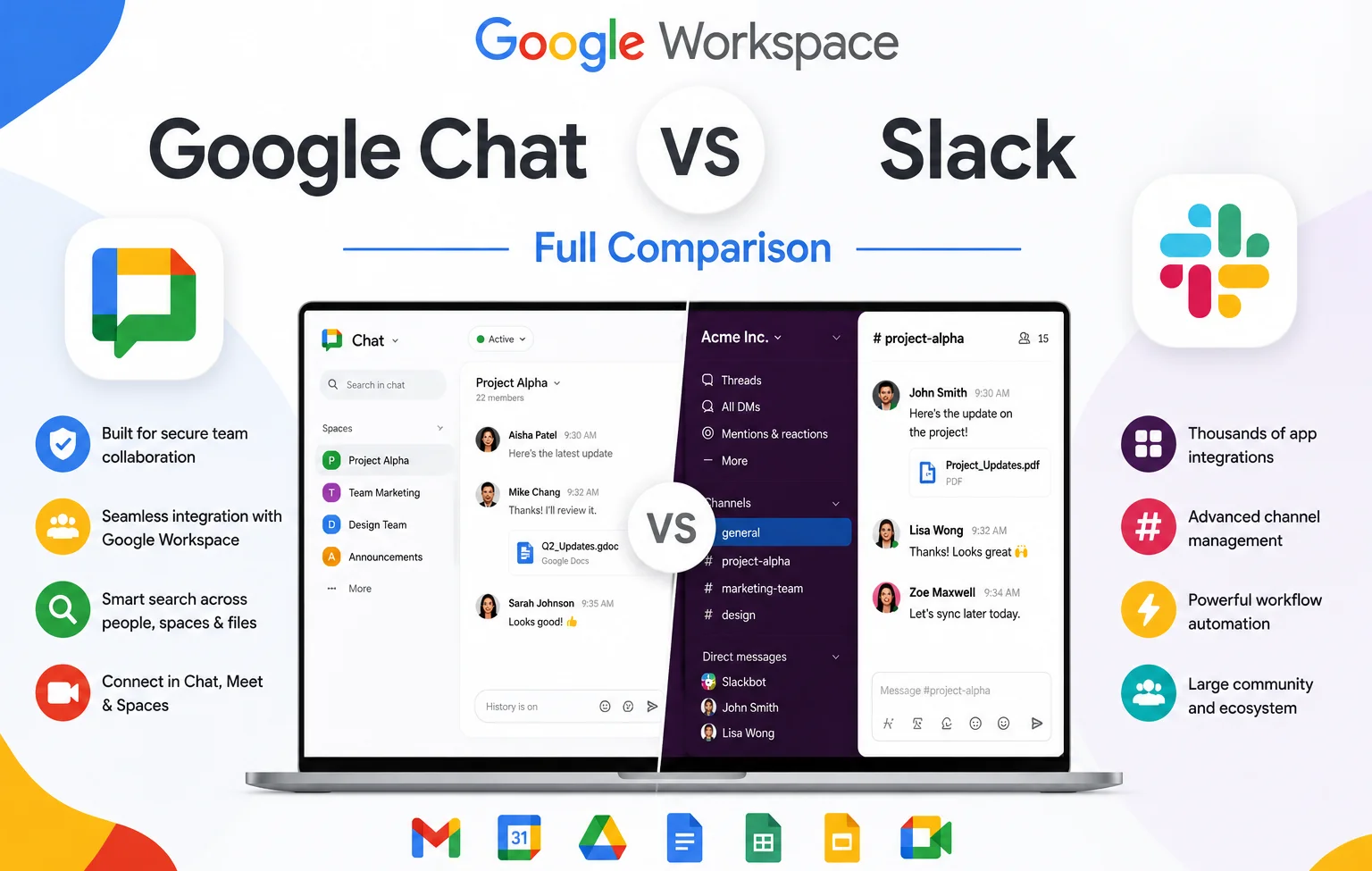
Google Chat is Google’s business messaging tool, included in every Google Workspace plan alongside Gmail, Drive, and Meet. Slack is a standalone messaging platform, owned by Salesforce, built around channels, direct messages, and a large ecosystem of third-party integrations. They started from different places: Slack launched in 2014 as a purpose-built workplace chat app, while Google Chat evolved from the consumer app Google Hangouts before being rebranded and rebuilt for Workspace.
What Is Google Chat?
Google Chat provides channel-based messaging (called spaces), direct messages, threaded replies, file sharing, and native integration with Google Meet for video calls. It’s included at no extra cost with every Google Workspace subscription, and it inherits admin, security, and privacy settings directly from your existing Workspace configuration rather than requiring a separate system to manage.
What Is Slack?
Slack offers channels, direct messages, threaded conversations, Huddles for quick audio and video check-ins, and a large app ecosystem through its App Directory. It has a free tier limited to 90 days of message history and 10 app integrations, with paid plans unlocking unlimited history, project management tools, and deeper AI features.
Chat Experience: Design and Usability
Slack’s chat experience is widely considered more polished. It offers one-click channel templates, for example, a Project Starter Kit that sets up messages, an overview, a tracker, and workflows in one step, along with detailed customization: adjustable emojis, display names, keyword-based notifications, and theme colours.
Google Chat has adopted many of Slack’s core features- threads, emojis, tagging- but the setup experience is more bare-bones. Creating a new space doesn’t come with templates, and the overall feel is functional rather than crafted. One genuine gap: Slack’s ability to auto-respond to common team questions (like “what’s the Wi-Fi password?”) has no direct equivalent in Google Chat, a feature some users specifically miss after switching.
Google Chat Spaces vs Slack Channels
Both tools organize conversations around groups: Slack calls them channels, Google Chat calls them spaces. Both support public or private visibility, threaded replies, and file sharing. For straightforward internal messaging, the core functionality is closer between the two platforms than most comparisons suggest; the bigger differences show up in surrounding features like templates, automation, and integrations rather than the core channel structure itself.
Project Management Features
Slack’s project management tools have grown considerably. Canvas, available on paid plans, works like a lightweight Notion page attached to each channel, useful for outlining goals, stakeholders, and files. Lists adds Kanban-style or table-based task tracking with owners and due dates. Business+ even includes a built-in, Salesforce-powered CRM that doesn’t require an existing Salesforce subscription to use.
Google Chat’s project tools are simpler: each space includes tabs for file sharing and task assignment, and tasks with due dates automatically sync to the assignee’s Google Calendar. It’s easy to use but not a substitute for a dedicated project management tool, though Google Workspace’s other apps (Tasks, Sheets, Keep) sit one tab away if more structure is needed.
Meetings: Google Meet vs Slack Huddles
Google Chat’s native integration with Google Meet is a real advantage for anything resembling a traditional meeting. Clicking the video icon embeds a Meet link instantly, and Google’s plans support anywhere from 100 to 1,000 participants depending on tier.
Slack’s Huddles are built for something different: quick, informal check-ins rather than scheduled meetings, capped at 50 participants and averaging around 10 minutes per session. Huddles preserve chat threads from the conversation automatically, which is useful for anyone who missed the discussion, and Slack Pro and above can add AI-generated notes and takeaways. For structured meetings needing breakout rooms or whiteboarding, Google Meet is the more complete tool; for spontaneous, low-friction check-ins, Huddles fits that specific niche well.
Automation and Workflows
Slack’s Workflow Builder, available on paid plans, includes over 60 prebuilt templates for tasks like welcoming new channel members or building approval flows, and Business+ adds AI-generated workflow creation.
Google’s equivalent, Workspace Studio, is available starting on Business Starter and focuses on automating actions across multiple Google apps at once, not just within Chat. You can add an AI step (an “Ask Gemini” action) at any point in a workflow. The trade-off: Google’s approach is broader (spanning your whole Workspace) but slightly less intuitive specifically for chat-only automations than Slack’s more narrowly focused builder.
AI Features Compared
Google Chat’s AI features, available from Business Standard upward, include conversation summaries, an “Ask Gemini” tool for querying a space’s accumulated knowledge, and automatic translation, useful for global teams working across languages in the same space.
Slack’s AI goes further on paid plans: automatic huddle transcripts and thread summaries come with any paid tier, and Business+ adds AI-powered search, daily recaps, file summaries, and Slackbot, now positioned as a “personal AI agent” that can search across messages and files, prep meeting briefs, and hand off tasks to connected tools like Salesforce Agentforce.
Integrations: Where Slack Leads
This is the clearest gap between the two platforms. Slack’s App Directory lists over 2,600 integrations, connecting to tools like Salesforce, Jira, GitHub, and Figma with minimal setup. Google Chat integrates natively and deeply with other Google apps (Gmail, Docs, Sheets), but its dedicated third-party app ecosystem, through the Google Workspace Marketplace, is roughly 100 apps, smaller and more Google-centric.
For teams whose daily workflow already runs through tools outside Google’s ecosystem, this gap is a real, practical consideration, not just a numbers comparison.
Pricing Comparison
| Google Chat (via Workspace) | Slack | |
|---|---|---|
| Free option | No standalone free plan; included with paid Workspace | Free tier, 90-day history, 10 integrations |
| Entry paid tier | $7/user/mo (Business Starter, no Chat AI) | ~$7.25/user/mo (Pro) |
| AI-enabled tier | $14/user/mo (Business Standard) | Included from Pro upward, expanded on Business+ |
| Higher tier | $22/user/mo (Business Plus) | $15/user/mo (Business+) |
If you’re already paying for Google Workspace, Chat effectively comes at no additional cost. Adding Slack on top means a second, fully separate subscription. One billing nuance worth knowing: Slack only charges for users active within a 28-day window and credits back inactive seats automatically, while Google’s annual Workspace plan doesn’t let you drop seats mid-term (the flexible monthly plan does, but costs roughly 20% more).
Privacy, Security, and HIPAA Compliance
Both platforms offer strong security credentials. Slack publishes compliance certifications including ISO, GDPR, and SOC 2. Google Chat inherits the same security infrastructure as the rest of Google Workspace, including Gmail-level phishing and spam protection.
For businesses needing HIPAA compliance specifically, Google Chat is the more affordable path: Business Plus includes the necessary security and admin features once a Business Associate Agreement (BAA) is signed, with some backend configuration required. Slack only supports HIPAA compliance on its pricier Enterprise+ tier, which has no published price and requires contacting sales.
Google Chat vs Slack vs Microsoft Teams
Adding Microsoft Teams to the comparison mostly shifts the decision toward ecosystem rather than features. Teams bundles into Microsoft 365 the way Google Chat bundles into Workspace, and it includes desktop Office app integration Google’s browser-based suite doesn’t offer. If your organization is already standardized on Microsoft 365, Teams offers the same “included at no extra cost” advantage Google Chat has for Workspace users. Slack remains the strongest standalone option regardless of which productivity suite you’re on, since it’s not tied to either ecosystem.
Discord vs Slack
Discord and Slack are sometimes compared, but they’re built for different audiences. Discord grew out of gaming and community server use, with a strong focus on voice channels and large, informal communities, and it remains free for most use cases with optional paid perks. Slack is purpose-built for business communication, with admin controls, compliance features, and business tool integrations Discord doesn’t prioritize. For an actual business team choosing a workplace chat tool, Slack (or Google Chat) is the more appropriate comparison than Discord, which fits better for gaming communities, open-source projects, or informal groups than for regulated business communication.
Which Should You Choose?
Choose Google Chat if you’re already on Google Workspace, your team communicates mostly internally, and you don’t have heavy dependencies on third-party tools like Salesforce or Jira. For most small teams under roughly 20 to 30 people, it covers the need without adding a second subscription.
Choose Slack if your team’s workflow depends on deep integrations with outside tools, you value a more polished chat experience and stronger AI features, or you regularly collaborate with external clients or partners through shared channels.
Consider both if your team needs Workspace for email, documents, and storage, but your workflow genuinely depends on integrations only Slack provides well. Running both isn’t a compromise; it’s matching each tool to what it does best, though it’s worth periodically revisiting whether the added Slack cost is still justified as your tool stack changes.
Common Mistakes to Avoid
- Assuming you need both by default. Many small teams are well served by Google Chat alone if their integration needs are light.
- Underestimating Slack’s real cost. A Workspace subscription with Slack layered on top means paying for two systems, so it’s worth calculating the combined per-user cost directly.
- Assuming chat history migrates automatically between platforms. It generally doesn’t; most switches are treated as a fresh start for messaging.
- Assuming Google Chat AI matches Slack’s. Google’s AI features are more limited in scope and require Business Standard or above.
- Confusing Discord with a business chat tool. It’s built for different use cases than workplace communication.
The Bottom Line
Google Chat and Slack solve the same core problem differently. Google Chat is free with Workspace, integrates natively with Meet and other Google apps, and is the cheaper HIPAA-compliant option, but its chat experience, AI depth, and third-party integrations are narrower than Slack’s. Slack offers a more polished experience, over 2,600 integrations, and stronger AI tools, at the cost of a separate subscription. For most small teams without heavy tool dependencies, Google Chat covers the need. For teams built around external integrations, Slack earns its extra cost.
FAQ
Is Google Chat as good as Slack?
For core internal messaging, the experience is comparable. Slack’s advantage is a much larger integration ecosystem and more advanced AI features; Google Chat’s advantage is being included free with Workspace and its native Meet integration.
Is Google Workspace cheaper than Slack?
Google Chat is included in Workspace pricing starting at $7 per user per month. Slack is priced separately, from free up to $15 per user per month for Business+, on top of whatever you’re already paying for email and documents.
What’s the difference between Google Chat spaces and Slack channels?
Both organize conversations into groups with similar core functionality: threads, direct messages, file sharing. The bigger differences show up in surrounding features like setup templates, automation, and integrations rather than the core structure.
How does Google Chat compare to Slack and Microsoft Teams?
Google Chat and Teams both bundle free into their respective productivity suites (Workspace and Microsoft 365). Slack remains the strongest standalone option regardless of ecosystem, with the largest integration library of the three.
Is Discord a good alternative to Slack for a business?
Not typically. Discord is built for gaming and community use, while Slack and Google Chat are purpose-built for business communication with admin controls and compliance features Discord doesn’t prioritize.
Can I use Google Chat and Slack together?
Yes. A common setup is running Google Workspace for email, documents, and storage, with Slack layered on top specifically for messaging and integrations, rather than treating it as a choice between one or the other.
Does Google Chat support HIPAA compliance?
Yes, on the Business Plus plan, once a Business Associate Agreement is signed and the account is configured correctly. Slack only supports HIPAA compliance on its pricier Enterprise+ tier.