Quick Answer
Google Workspace is a full productivity suite (Gmail, Docs, Meet, Chat, Drive) built for browser-first collaboration, starting at $8/user/month officially or from $2.50/user/month through an authorized reseller. Microsoft Teams is primarily a communication and meetings app that becomes most valuable when bundled into Microsoft 365, starting at $4/user/month standalone or $7–$22/user/month as part of a Business plan. Choose Google Workspace if you want one simple suite with built-in email and docs; choose Teams if you’re already committed to the Microsoft 365 ecosystem.
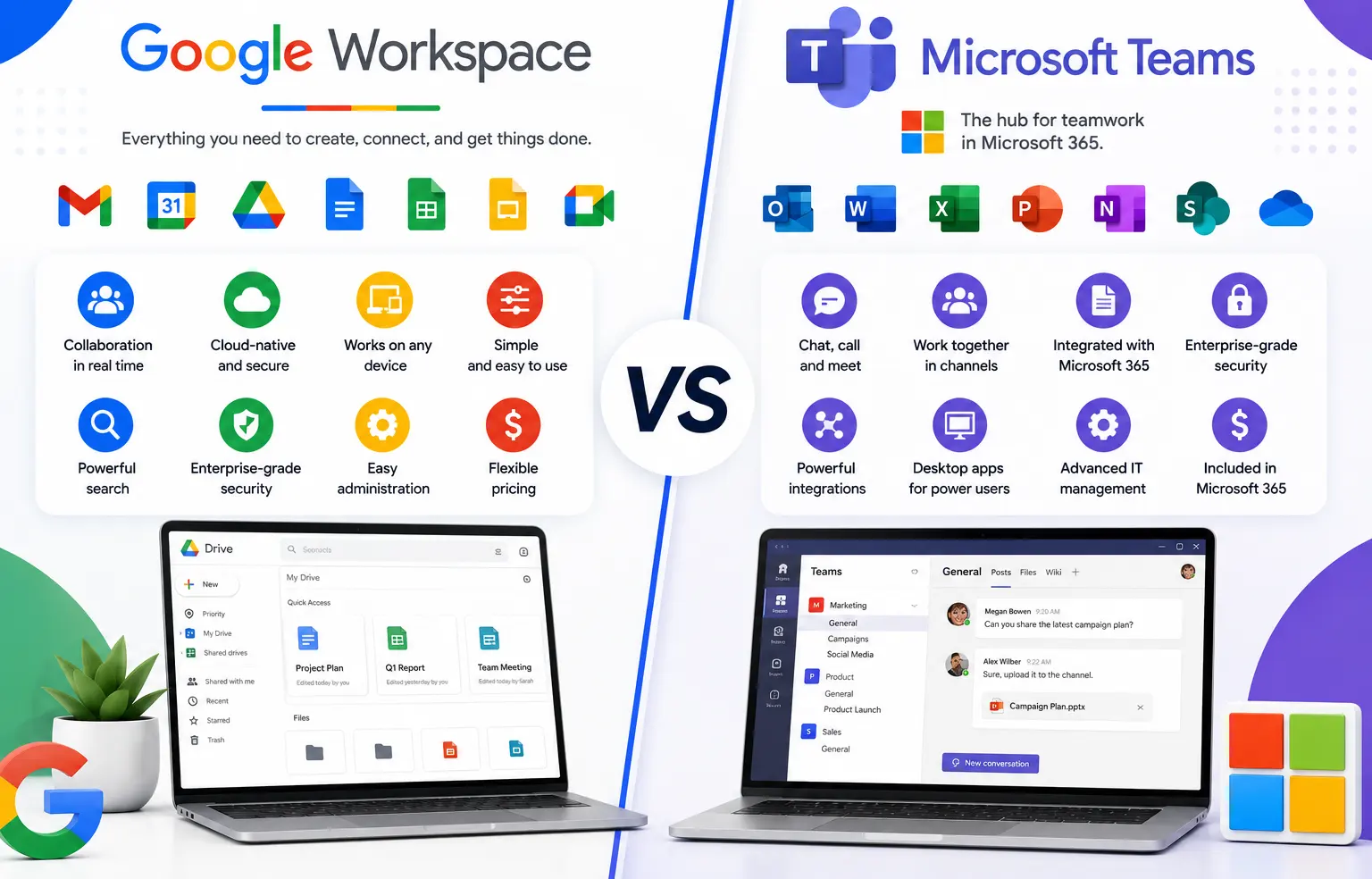
Choosing between Google Workspace and Microsoft Teams is really a choice between two different philosophies of getting work done. Google Workspace puts email, documents, and meetings inside one browser-based suite. Microsoft Teams puts chat and meetings at the center, and expects you to bring the rest of Microsoft 365 with you. Getting this decision right matters, because switching platforms later means re-training your team and migrating years of email and files.
Google Workspace vs Microsoft Teams at a Glance
| Google Workspace | Microsoft Teams | |
|---|---|---|
| What it is | Full productivity and email suite | Chat and meetings app inside Microsoft 365 |
| Starting price (official) | $8/user/month (Business Starter) | $4/user/month (Teams Essentials, standalone) |
| Starting price with email + apps | Included at $8/user/month | $7/user/month (Microsoft 365 Business Basic) |
| Admin console | One unified console | Multiple admin centers (Teams, Exchange, Entra ID) |
| Meeting capacity | Up to 500 participants (Business Plus) | Up to 300–1,000 depending on tier |
| Offline access | Limited, connectivity-dependent | Limited, similar constraints |
| Best for | Teams that want simple, browser-first collaboration | Organizations already invested in Microsoft 365 |
What Is Google Workspace?
Google Workspace is Google’s business suite: Gmail for custom business email, Google Meet for video calls, Google Chat for messaging, and Docs, Sheets, and Slides for real-time document collaboration, all managed from one admin console. Everything runs in the browser, so there’s little to install and updates happen automatically in the background.
What Is Microsoft Teams?
Microsoft Teams is Microsoft’s chat, video meeting, and file-collaboration app. On its own, a standalone Teams plan gives you messaging and meetings but not business email or the full desktop Office apps. Most companies end up on a Microsoft 365 Business plan instead, which bundles Teams together with Outlook, Word, Excel, and PowerPoint. That distinction trips a lot of buyers up, because “Microsoft Teams pricing” and “Microsoft 365 pricing” usually mean the same purchase decision in practice.
Is Google Teams the Same as Microsoft Teams?
No — there’s no separate product called “Google Teams.” When people search for the Google equivalent of Microsoft Teams, they’re usually looking for two separate Google Workspace tools working together: Google Chat for messaging and Google Meet for video calls. Google chose to keep messaging and video as two connected apps inside Workspace rather than merging them into one branded product the way Microsoft did with Teams.
Google Workspace vs Microsoft 365: What’s the Real Difference?
This is where the “Google Workspace vs Microsoft Teams vs Microsoft 365” confusion usually comes from. Microsoft Teams is a single app; Microsoft 365 is the full suite that Teams lives inside — the direct counterpart to Google Workspace, not to Teams alone. So the fairer comparison is:
- Google Workspace = Gmail + Meet + Chat + Docs/Sheets/Slides + Drive, in one console
- Microsoft 365 (Business plans) = Outlook + Teams + Word/Excel/PowerPoint + OneDrive/SharePoint, across several admin centers
If your business is comparing “should we buy Google Workspace or Microsoft Teams,” you’re almost certainly deciding between Google Workspace and a Microsoft 365 Business plan, since a standalone Teams license won’t replace your email and document tools.
Pricing Comparison: Google Workspace vs Microsoft Teams (2026)
Official Google Workspace pricing has three main business tiers, each also available through an authorized reseller at a lower rate. No hidden charges. No extra taxes. The price you see is the price you pay.
| Plan | Official Google Price | GoogleWorkspace Resellers Price | Monthly Saving | Yearly Saving |
|---|---|---|---|---|
| Starter, below 300 users | $8/user/month | $3/user/month | Save $5/user/month | Save $60/user/year |
| Starter, 300+ users | $8/user/month | $2.50/user/month | Save $5.50/user/month | Save $66/user/year |
| Business Standard | $18/user/month | $13/user/month | Save $5/user/month | Save $60/user/year |
| Business Plus | $28/user/month | $20/user/month | Save $8/user/month | Save $96/user/year |
The official Google Workspace Starter plan price is $8/user/month, but Google Workspace Resellers offer it from $2.50/user/month when you have 300+ users.
Microsoft’s pricing works differently, since Teams itself is rarely bought alone:
| Plan | What’s Included | Price |
|---|---|---|
| Teams Essentials (standalone) | Chat, meetings, file sharing — no business email | $4/user/month |
| Microsoft 365 Business Basic | Teams + web/mobile Office apps + Exchange email | $7/user/month |
| Microsoft 365 Business Standard | Teams + desktop Office apps + email | $14/user/month |
| Microsoft 365 Business Premium | Above + advanced security and device management | $22/user/month |
At the entry tier, Microsoft 365 Business Basic ($7/user/month) looks close to Google Workspace’s official Starter price ($8/user/month) — but once you factor in reseller pricing, Google Workspace becomes the clearly cheaper option for most small and mid-sized teams.
Google Meet vs Microsoft Teams for Video Calls
Both platforms handle day-to-day video meetings well. Google Meet keeps things simple: join from a browser link, with no desktop client required, and meeting capacity scales up to 500 participants on Business Plus. Microsoft Teams supports larger enterprise meetings — up to 1,000 participants on higher tiers — and adds features like Teams Phone for desk-phone style calling, which Google Meet doesn’t natively match. For a typical small business running internal meetings and client calls, Meet’s simplicity is usually enough. For a company that needs large webinars or plans to replace its phone system, Teams has the deeper toolset.
Google Chat vs Microsoft Teams vs Slack
Since “Slack” showed up alongside this comparison, it’s worth placing it correctly: Slack is a third messaging platform that competes with both Google Chat and Microsoft Teams’ chat function, but it isn’t bundled with either email or document suite. Google Chat is included at every Google Workspace tier and is tied directly into Gmail and Docs. Microsoft Teams chat is included with Microsoft 365 and ties into Outlook and SharePoint. If your team already lives inside Gmail or Outlook, the built-in chat tool (Google Chat or Teams) usually creates less app-switching than adding Slack on top.
Is Google Workspace Free?
Google Workspace itself is not free for business use — every business plan starts at a paid tier because it includes custom email addresses on your own domain. What’s free is Gmail for personal use and Google’s individual apps (Docs, Sheets, Meet) with a personal Google account, which don’t include business email, admin controls, or the storage pooling that Workspace provides. Microsoft Teams does offer a genuinely free tier with limited meeting length and storage, but it also lacks custom business email.
Common Mistakes Businesses Make in This Comparison
Comparing Teams pricing to Workspace pricing directly. A standalone Teams Essentials price ($4/user/month) looks cheaper than Google Workspace, but it doesn’t include business email. The fair comparison is Google Workspace against a Microsoft 365 Business plan, not against Teams alone.
Assuming “Google Teams” exists as one app. Buyers searching for a single Google product to match Teams often miss that the equivalent is two connected tools — Chat and Meet — which changes how the admin setup and user experience actually compare.
How to Choose: A Simple Decision Framework
Google Workspace tends to fit better when:
- You don’t have Microsoft 365 licensing already in place
- You want one admin console instead of several
- Your team is comfortable working entirely in a browser
- Fast setup and predictable per-user pricing matter more than deep enterprise voice features
Microsoft Teams (via Microsoft 365) tends to fit better when:
- You already have Microsoft 365 E3/E5 licensing to build on
- You need very large meeting capacity or a built-in phone system
- Your team relies heavily on desktop Word, Excel, and PowerPoint with advanced formatting
- You have IT staff comfortable managing multiple Microsoft admin centers
Neither platform is universally “better” — the right pick depends on what you’re already running and how much administrative overhead your team can absorb.
Buying Direct vs Through an Authorized Reseller
Once you’ve settled on Google Workspace, the next decision is how to buy it. Buying directly from Google works fine if you have an internal IT team, a simple single-domain setup, and no email migration to manage. An authorized reseller tends to make more sense if you’re migrating from another email provider, don’t have a dedicated IT specialist, or want ongoing setup and billing support at a lower per-user price than Google’s direct rate. Both routes give you the same Google servers and the same product — the difference is support and price, not the software itself.
Honest Limitation
Neither platform fully replaces the other’s ecosystem. If your business depends on complex Excel macros, SharePoint workflows, or Teams Phone for desk-based calling, moving to Google Workspace will mean real adjustment, not just a like-for-like swap. Similarly, if your team is used to Google Docs’ simplicity, Microsoft’s desktop-first Office apps can feel heavier to onboard. Test either platform with a small pilot group before migrating your whole company.
FAQs
Is Google Teams the same as Microsoft Teams?
No. There is no product called “Google Teams.” Google’s equivalent to Microsoft Teams is a combination of Google Chat (messaging) and Google Meet (video calls), both included in every Google Workspace plan.
What is the Google version of Microsoft Teams?
Google Chat and Google Meet together serve the role Microsoft Teams plays on its own — messaging through Chat and video meetings through Meet, both accessible from Gmail and the Google Workspace admin console.
Is Google Workspace or Microsoft 365 cheaper?
At official list prices, Google Workspace Business Starter ($8/user/month) and Microsoft 365 Business Basic ($7/user/month) are close. Through an authorized reseller, Google Workspace Starter drops to $2.50–$3/user/month, making it the cheaper option for most small and mid-sized teams.
Is Google Workspace free?
No, Google Workspace business plans are paid because they include custom business email and admin controls. Personal Gmail and individual Google apps are free but don’t include those business features.
O365 vs Google Workspace: which is better for a small business?
It depends on your existing tools. If you’re starting fresh with no Microsoft licensing, Google Workspace’s single admin console and lower entry pricing (especially through a reseller) are usually simpler for a small team to manage. If you already rely on desktop Excel or Outlook workflows, staying with Microsoft 365 avoids a retraining cost.
Can I use both Google Workspace and Microsoft Teams together?
Yes. Some businesses run Google Workspace for email and documents while keeping Microsoft Teams for meetings with external partners who use Microsoft 365, though this adds licensing cost and means managing two admin systems instead of one.
Conclusion
Google Workspace and Microsoft Teams solve collaboration differently: Workspace bundles email, documents, and meetings into one simple suite, while Teams is a chat and meetings app that depends on a broader Microsoft 365 plan to match Workspace’s scope. For a business without existing Microsoft licensing, Google Workspace’s single admin console and lower reseller pricing make it the simpler and more cost-effective starting point. If your team already runs on Microsoft 365, staying with Teams avoids unnecessary migration work. Whichever direction fits your business, comparing official pricing against authorized reseller pricing before you buy is worth the five minutes it takes.