Quick Answer
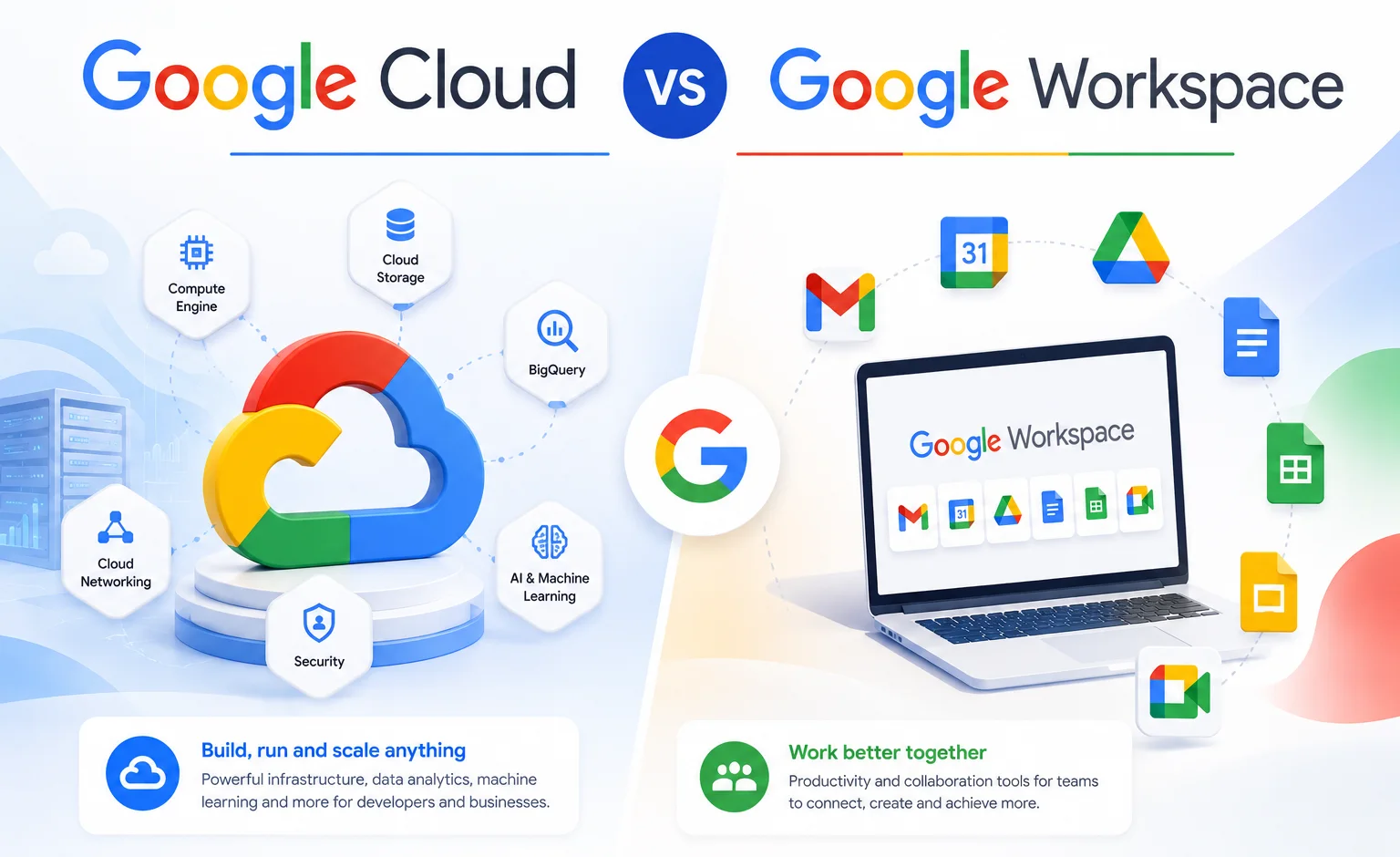
Google Workspace and Google Cloud are not competing products; they solve completely different problems. Google Workspace is a per-user productivity suite (Gmail, Drive, Docs, Meet, Calendar) built for teams that need business email and daily collaboration tools, starting at $8/user/month officially or from $2.50/user/month through an authorized reseller. Google Cloud Platform is developer infrastructure, priced on usage rather than per user, built for hosting applications, running databases, and managing technical systems. Almost every business needs Workspace. Very few small businesses need Google Cloud Platform directly.
The confusion here comes down to one word: “Cloud.” Google uses it in the name of a business productivity suite and, separately, in the name of a completely different developer infrastructure platform. Searching “Google Cloud for my business” and landing on Google Cloud Platform’s console, with no sign of email or a document editor anywhere, is a common and understandable mistake. This guide sorts out what each product actually is and which one your business needs.
What Is Google Workspace?
Google Workspace is Google’s business productivity suite: Gmail on your own domain, Google Drive for team file storage, Docs, Sheets, and Slides for document collaboration, Meet for video calls, Calendar for scheduling, and Chat for team messaging, all managed from one admin console. Every paid plan also includes Gemini AI features, expanding from Gmail-only on Business Starter to across every app from Business Standard upward. This is the product almost every business, regardless of size or industry, actually needs for daily communication and collaboration.
What Is Google Cloud Platform?
Google Cloud Platform (GCP) is Google’s infrastructure-as-a-service offering, the direct equivalent of Amazon Web Services. It includes Compute Engine for virtual servers, Cloud Storage for large-scale object storage, Cloud SQL for managed databases, and dozens of other services for building, hosting, and running software applications. There is no email client in GCP, no document editor, no calendar, and no video conferencing tool. It’s built for developers and IT teams running technical infrastructure, not for employees doing everyday work. A typical small business with no software product to host has no practical use for it.
Google Workspace vs Google Cloud Platform: The Core Difference
| Google Workspace | Google Cloud Platform | |
|---|---|---|
| Purpose | Productivity suite for employees | Developer infrastructure |
| Primary user | Every employee | Developers, IT teams |
| Key products | Gmail, Drive, Docs, Meet, Calendar | Compute Engine, Cloud Storage, Cloud SQL |
| Business email included | Yes | No |
| Pricing model | Per user, per month | Pay-as-you-go usage |
| Typical use | Daily communication and collaboration | Hosting apps, running databases, data pipelines |
| Needed by most small businesses | Yes | Rarely |
One detail worth calling out directly: Google Drive (team file storage in Workspace) and Google Cloud Storage (developer object storage in GCP) are not the same product despite the similar name. Cloud Storage is billed per gigabyte for storing application data like backups and media files at scale; it has no folders your sales team can browse, no document viewer, and no version history in the way Drive does. If your team needs a shared place to store and collaborate on files, that’s Google Drive, included in every Workspace plan, not Google Cloud Storage.
Google Cloud vs Google Workspace Cost
These two products are priced on fundamentally different models, which is why comparing a single number across both is misleading.
Google Workspace uses flat per-user, per-month pricing. No hidden charges. No extra taxes. The price you see is the price you pay.
| Plan | Official Google Price | GoogleWorkspace Resellers Price | Monthly Saving | Yearly Saving |
|---|---|---|---|---|
| Starter, below 300 users | $8/user/month | $3/user/month | Save $5/user/month | Save $60/user/year |
| Starter, 300+ users | $8/user/month | $2.50/user/month | Save $5.50/user/month | Save $66/user/year |
| Business Standard | $18/user/month | $13/user/month | Save $5/user/month | Save $60/user/year |
| Business Plus | $28/user/month | $20/user/month | Save $8/user/month | Save $96/user/year |
Google Cloud Platform, by contrast, bills based on consumption: compute time, storage used, data transferred, and which specific services you run, often down to the second. A small application might cost a few dollars a month to host. A data-intensive workload can run into the thousands. There’s no flat “starting price” comparable to Workspace’s per-user rate, because GCP’s cost depends entirely on what you build and how much traffic or data it handles. See the full Google Workspace pricing breakdown for every business tier, or try the free trial before committing.
Google Workspace vs Google Cloud Identity
Google Cloud Identity is an identity and access management (IAM) service, google’s tool for controlling who can log into what, enforcing multi-factor authentication, and managing user accounts across an organization. When you buy Google Workspace, an admin console with this same identity infrastructure is already included. Cloud Identity is the standalone version, available without a full Workspace subscription, and it has a free tier that lets you create company-domain user accounts for people who need SSO access to third-party apps or GCP services but don’t need Gmail, Drive, or the rest of the Workspace suite. A common use case is contractors who only need login credentials for one internal application: giving them a Cloud Identity free-tier account instead of a full Workspace license avoids paying for tools they’ll never use. The tradeoff is that Cloud Identity in isolation requires someone comfortable configuring SSO and directory management, so for most small businesses without dedicated IT staff, buying full Workspace licenses is still the simpler path.
Google Cloud Console vs Google Workspace: Two Different Admin Panels
Adding to the naming confusion, Google Cloud Platform and Google Workspace each have their own separate administrative interface. The Google Cloud Console (console.cloud.google.com) is where developers manage GCP resources: virtual machines, storage buckets, databases, and billing for infrastructure usage. The Google Workspace Admin Console (admin.google.com) is where IT admins manage users, security policies, and app access for a Workspace organization. They don’t share settings, billing, or user data, and logging into one doesn’t give you access to the other. If you’re looking for where to manage employee email accounts, that’s the Workspace Admin Console, not the Cloud Console.
Google One vs Google Workspace vs Google Cloud: The Full Family
Google actually sells three distinct products that get confused with each other regularly: Google One (personal storage and consumer Gemini AI, now largely rebranded as Google AI plans), Google Workspace (business productivity), and Google Cloud Platform (developer infrastructure). None of the three substitute for each other. Google One is for individuals who want more personal storage on a Gmail account. Google Workspace is for businesses needing custom domain email and team tools. Google Cloud Platform is for building and hosting software. A freelancer might use Google One for personal storage while also running Google Workspace for client-facing business email, and a growing tech company might run Workspace for its team alongside GCP for its hosted product, three separate subscriptions serving three separate purposes.
G Suite vs Google Workspace: What’s the Difference?
If you’re seeing “G Suite” pricing or plans in older material, it’s the same product under its previous name. Google rebranded G Suite to Google Workspace in 2020, replacing the old Basic, Business, and Enterprise tier names with Business Starter, Business Standard, and Business Plus. There’s no functional difference between G Suite and Google Workspace beyond the name and some feature updates since the rebrand; anyone asking about the difference between Google Suite and Google Workspace is really asking about the same product across two branding eras. For a complete breakdown, see our G Suite vs Google Workspace comparison.
Is Google Cloud Worth It?
For a business that’s actually building or hosting a software application, yes, Google Cloud Platform is a legitimate and widely used choice against alternatives like AWS or Microsoft Azure, with the value depending on the specific workload and how efficiently it’s architected. For a typical small business with no software product to host, the question doesn’t really apply, since GCP solves a problem that business doesn’t have. The more useful question for most readers of this comparison is whether Google Workspace is worth it, and for businesses needing professional email and team collaboration tools, it generally is, especially with reseller pricing narrowing the cost further.
Is Google Cloud a Good Place to Work?
This version of the question is usually about Google Cloud as an employer rather than as a product, a different topic entirely from the software comparison this guide covers. Employee sentiment about working at Google or on the Google Cloud team specifically is better answered by employer review platforms like Glassdoor or Indeed, which track current employee ratings and reviews directly, than by a product comparison guide. If you’re researching Google Cloud as a career move rather than a business purchase, those sources will serve you better than anything here.
Google Workspace Login: Where to Sign In
Employees on a Google Workspace account sign in the same way as a personal Google account, at mail.google.com for Gmail or accounts.google.com generally, using their work email address and password (plus any multi-factor authentication your organization requires). Admins manage users, security policies, and billing separately through the Workspace Admin Console at admin.google.com, which is a different login destination from the everyday employee sign-in page.
Common Mistakes When Comparing These Products
Buying Google Cloud Platform expecting to find email and team tools inside it. This is the most common and most expensive mistake in this comparison. GCP has no productivity apps of any kind. If your team needs business email, the product you want is Google Workspace.
Treating Google Drive and Google Cloud Storage as interchangeable. Seeing a low per-gigabyte Cloud Storage price and assuming it’s cheap team file storage leads to a bad purchase. Cloud Storage is developer infrastructure for application data, not a collaboration tool.
How to Choose: A Simple Decision Framework
Choose Google Workspace when:
- Your team needs business email, shared documents, video calls, and file storage
- You want predictable, flat per-user monthly pricing
- Nobody on your team is building or hosting a software application
Choose Google Cloud Platform when:
- You’re building, hosting, or running a technical application
- You need infrastructure like virtual machines, managed databases, or large-scale storage
- Your costs will scale with usage rather than headcount
Choose Google Cloud Identity alongside Workspace when:
- You have contractors or staff who need company-domain SSO access to specific apps, but not full Workspace tools
- You have IT staff comfortable configuring identity and access management
Choose both Workspace and Google Cloud Platform when:
- You have employees doing daily work and developers hosting or building an application, run as two separate subscriptions for two separate teams
Buying Google Workspace Direct vs Through an Authorized Reseller
If Workspace is the product you need, buying directly from Google works fine for businesses with internal IT support and a simple setup. An authorized reseller tends to make more sense for businesses migrating from another email provider, without dedicated IT staff, or wanting the lower per-user rate with ongoing setup support. Google Cloud Platform doesn’t have an equivalent reseller-discount structure in the same way, since its usage-based pricing works differently from Workspace’s flat per-user model.
Honest Limitation
This guide can tell you which of these products your business generally needs, but it can’t fully map a complex technical environment. If your organization is managing SSO across multiple platforms, custom application access policies, and a mix of Workspace and GCP usage across different teams, that’s a conversation for a Workspace specialist or cloud architect, not something a comparison article can settle definitively.
Conclusion
Google Workspace and Google Cloud Platform share a name and a parent company, but they were built for entirely different jobs. Workspace handles the email, documents, meetings, and file sharing that every business team needs day to day. Google Cloud Platform handles the technical infrastructure behind software applications, which most small businesses never touch directly. For the overwhelming majority of businesses landing on this comparison, the answer is Workspace, and buying it through an authorized reseller keeps the cost meaningfully below Google’s direct pricing.
FAQs
Is Google Workspace the same as Google Cloud?
No. Google Workspace is a productivity suite (Gmail, Drive, Docs, Meet, Calendar) for business teams. Google Cloud Platform is developer infrastructure for building and hosting applications. They share a brand name but serve completely different purposes.
What is the difference between Google Workspace and G Suite?
Nothing functionally. G Suite was renamed Google Workspace in 2020, and the current Business Starter, Business Standard, and Business Plus plans replaced the old G Suite tier names. Any reference to “Google Suite” is describing the same product as Google Workspace.
How much does Google Workspace cost compared to Google Cloud?
Google Workspace costs $8/user/month officially, or from $2.50/user/month through an authorized reseller, depending on the tier. Google Cloud Platform is priced by usage rather than per user, so its cost depends entirely on what infrastructure you run and how much traffic or storage it consumes.
Can I use Google Cloud Platform instead of Google Workspace for business email?
No. Google Cloud Platform has no email client, calendar, or document editor. If you need business email on your own domain, you need Google Workspace, not GCP.
What is Google Cloud Identity and is it free?
Google Cloud Identity is Google’s identity and access management service. It has a free tier that lets you create company-domain user accounts for SSO access to apps without purchasing a full Workspace license, useful for contractors who need login credentials but not email or Drive.
Do I need both Google Workspace and Google Cloud Platform?
Most businesses only need Google Workspace. You need both only if your business has employees using daily productivity tools and developers hosting or building a technical application, in which case they run as two separate subscriptions.
Is Google Cloud worth it for a small business?
Only if your business is actually building or hosting a software application, for everyday communication, documents, and collaboration, Google Workspace is the product that applies, and it’s generally worth it, especially at reseller pricing.