Quick Answer
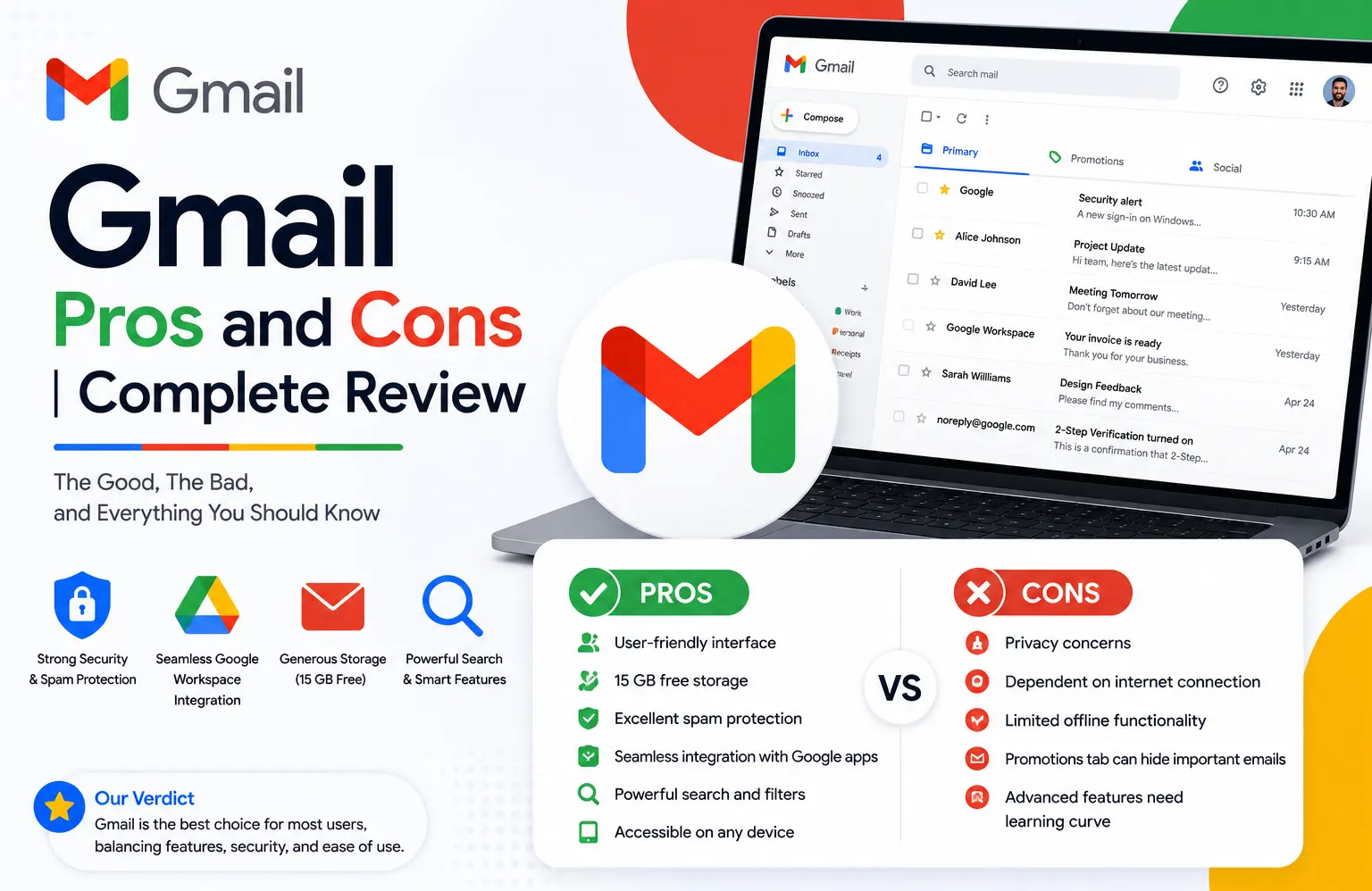
Gmail’s biggest strengths are its deep integration with Google’s other apps, generous free storage, strong spam filtering, and AI-assisted smart features built into every account at no extra cost. Its main drawbacks are a label-based organization system that trips up people used to folders, real privacy trade-offs from data-driven ad personalization on free accounts, and mobile app limitations compared to the full desktop experience. For business use through Google Workspace, those same strengths carry over, but paid plans add real costs, a genuine admin learning curve, and daily sending limits worth knowing about before you commit.
Gmail is the most widely used email service in the world, which means it’s also the most argued about. Some of that argument is outdated (privacy concerns from years ago that no longer apply the same way), and some of it is a genuine, current trade-off worth understanding before you build your personal or business email around it. This review breaks Gmail’s pros and cons down by use case, personal, business, student, and against its main competitors, so you’re weighing the right comparison for your situation.
Gmail Pros: Where It Excels
Google ecosystem integration. Gmail connects natively to Calendar, Drive, Docs, Sheets, Slides, and Photos. You can turn an email into a calendar event, attach a file directly from Drive without downloading it first, or insert a photo straight from Google Photos, all without leaving your inbox.
Cross-platform access. As a fully web-based service, Gmail works identically from any browser on any device, with dedicated mobile apps for Android and iOS for on-the-go access.
A genuinely user-friendly interface. Gmail’s inbox view is customizable, the menu is easy to show or hide for more screen space, and settings for labels, filters, and forwarding are clearly organized rather than buried.
Useful built-in productivity features. Snooze, Undo Send, Schedule Send, reusable templates, and calendar availability shown directly in the compose window all save real time without needing a separate add-on.
Strong security options. Two-step verification, passkeys and security keys, a security activity log, and a dedicated Security Checkup tool are all included, alongside solid default spam and phishing filtering.
Generous free storage. Free Gmail accounts include 15GB of storage shared across Gmail, Drive, and Photos, more than enough for most personal use before you’d need to pay for additional space.
Gmail Cons: Where It Falls Short
Labels instead of folders. Gmail organizes mail with labels rather than the folder system most other email providers use. It’s more flexible once you’re used to it, letting one email carry multiple labels at once, but it’s a genuine adjustment for anyone switching from a folder-based system, and Gmail has no dedicated Archive folder for quickly browsing everything you’ve archived.
Privacy trade-offs on free accounts. Google’s free tier involves scanning email content to personalize ads, which some users find intrusive regardless of how it’s technically implemented, and in-inbox ads are a visible, sometimes distracting, part of the free experience.
Google ecosystem dependency. The same deep integration that’s a pro can become a con if you’d rather use best-in-class tools from different providers instead of standardizing entirely on Google’s suite.
Mobile app limitations. Not every desktop feature exists in the mobile app. Creating or managing filters, for example, isn’t possible from the Gmail mobile app, and some bulk actions are more cumbersome on a phone than in a browser.
Limited free storage relative to heavy use. 15GB sounds generous until it’s shared across Gmail, Drive, and Photos for someone who stores a lot of large attachments or high-resolution images; additional storage costs roughly $20 a year for the entry-level paid tier.
Gmail Pros and Cons for Business (via Google Workspace)
Business Gmail runs through Google Workspace, and it carries over most of personal Gmail’s strengths while adding its own business-specific pros and cons.
Business pros:
- Custom domain branding, a professional you@yourcompany.com address instead of a personal Gmail address
- Advanced security controls, including the ability to disable ads entirely, configure content and retention policies, and enforce advanced phishing and malware protection
- Real collaboration tools, shared mailboxes, shared calendars, and shared drives for team file storage
- Admin controls, managing users, groups, access, and security policies centrally
- More storage, from 30GB on Business Starter up to 5TB pooled on higher tiers
- 24/7 support, included on paid business plans
Business cons:
- Subscription cost, official pricing runs $8 to $28/user/month depending on plan, though authorized reseller pricing brings this down considerably
- A real admin learning curve, initial setup and ongoing administration aren’t always intuitive for a first-time admin
- Daily sending limits: standard Business accounts cap outbound mail around 2,000 recipients per day, with lower limits for mail merge and per-message recipient counts, worth planning around if your business sends high email volume
Disadvantages of Google Workspace Beyond Gmail Itself
Some Google Workspace disadvantages go beyond Gmail specifically and apply to the broader suite. The admin console, while powerful, has enough depth that a business without any IT background can find initial setup genuinely overwhelming without help. Storage, while generous, is pooled and tiered in a way that requires actually understanding your organization’s usage before picking a plan, rather than defaulting to whichever tier sounds reasonable. And switching an entire team to Google’s ecosystem from something else, most commonly Microsoft 365, involves real retraining time, even though the individual apps themselves are generally considered easy to learn.
Gmail Pros and Cons for Students
Gmail is popular among students largely because most schools already provide Google Workspace for Education accounts, giving students free access to Gmail alongside Docs, Drive, and Meet for coursework and collaboration. The pros for students mirror the general pros above: generous storage (often expanded under education plans), strong integration with Google Classroom and collaborative document editing for group projects, and cross-device access for working between a school computer, a personal laptop, and a phone. The main con specific to student use is that a school-provided Gmail account is managed by the institution’s admin, meaning access typically ends after graduation, and some schools restrict certain features (like external sharing) for security reasons that can occasionally get in the way of legitimate group project needs.
Gmail’s Smart Features: Pros and Cons
Gmail’s AI-assisted smart features, Smart Compose (predictive text as you type), Smart Reply (one-click suggested responses), and conversation view (grouping related emails into a single thread), are genuinely useful time-savers for most users, cutting down on repetitive typing and making long email chains easier to follow. The trade-off: some users find Smart Compose’s suggestions distracting or feel it nudges their writing style in a generic direction, and conversation view specifically divides opinion; some find it essential for following a back-and-forth thread, while others find it makes locating one specific message within a long thread more tedious than a flat, unthreaded list would. All of these features can be turned off individually in Gmail’s settings if they don’t fit how you prefer to work.
Gmail vs Outlook: Pros and Cons
Gmail’s advantages over Outlook center on its browser-first simplicity, tighter integration with Google’s own apps, and (through Google Workspace) generally lower business pricing at comparable tiers. Outlook’s advantages center on deeper desktop app functionality, particularly for complex calendar scheduling and enterprise-specific features, and a smoother fit for organizations already standardized on Microsoft 365 and its broader Office suite. Neither is universally better; the right choice tends to follow whichever ecosystem, Google or Microsoft, your organization or personal workflow is already built around.
Gmail vs ProtonMail: Pros and Cons
ProtonMail’s core advantage over Gmail is privacy: end-to-end encryption by default and a business model that doesn’t rely on scanning email content for ad personalization. Gmail’s advantage is ecosystem breadth and familiarity, deep integration with a full productivity suite, broader third-party app support, and a significantly larger user base that makes collaboration with contacts simpler by default. For someone whose primary concern is maximum privacy, ProtonMail is the more purpose-built option. For someone prioritizing integration with a broader set of collaboration and productivity tools, Gmail remains the more practical everyday choice.
Gmail vs Yahoo: A Quick Comparison
Gmail generally outperforms Yahoo Mail on interface design, spam filtering effectiveness, and ecosystem integration. Yahoo’s storage allowance is technically larger on paper, but Gmail’s tighter integration with a genuinely useful productivity suite (Docs, Sheets, Meet) tends to outweigh a larger but more isolated storage pool for most users comparing the two directly.
Should You Switch From Gmail, or Just Change Your Gmail Address?
These are two different questions worth separating. Switching your Gmail address (moving to a new @gmail.com address while staying on Gmail) mainly matters for personal branding or leaving behind an old, unprofessional address; the main con is updating every service and contact tied to the old address, which is more tedious than technically difficult. Switching away from Gmail entirely to a different provider is a bigger decision, and the pros and cons depend heavily on which alternative you’re weighing: ProtonMail for privacy, Outlook for Microsoft ecosystem fit, or a business email through Google Workspace if you’re currently on free personal Gmail and want a custom domain. In most cases, the better first move for a business is moving from Gmail to Google Workspace rather than leaving Google’s ecosystem entirely.
Multiple Gmail Addresses: Pros and Cons
Having more than one Gmail address, one personal, one for a side project, for example, gives you clean separation between different parts of your life and can help with inbox organization by context. The trade-off is real: managing multiple inboxes means checking more than one place for messages (unless you set up forwarding), remembering which address you gave to which service, and potentially juggling separate calendars and Drive storage across accounts unless you’re deliberate about consolidating where it makes sense.
Migrating to Gmail and Google Workspace: What Changes
For a business or individual migrating from another provider to Gmail and Google Workspace, the pros are the ecosystem and collaboration benefits covered throughout this guide. The practical cons worth planning for: existing email and files need to be migrated (a process that takes real time depending on data volume), your team needs some retraining on labels versus folders and Gmail’s interface generally, and if you’re moving a business specifically, you’ll want to compare Google Workspace pricing against your current provider, including checking whether an authorized reseller offers a lower rate than Google’s official price for the same migration.
Quick Answers: Gmail Login, Account Creation, and Recovery
Gmail login: Sign in at mail.google.com or gmail.com using your Google account email and password, with two-step verification prompting for an additional confirmation if you have it enabled.
Creating a Gmail account: New accounts are created at accounts.google.com/signup, requiring a name, a chosen address (subject to availability), and a password; the process takes a few minutes for a personal account.
Gmail account recovery: If you’re locked out, Google’s account recovery flow at accounts.google.com/signin/recovery walks through verifying your identity via a recovery email, phone number, or security questions, depending on what you’ve set up in advance. Setting up recovery options before you need them is the single most useful step to avoid a prolonged lockout later.
Common Mistakes When Weighing Gmail’s Pros and Cons
Comparing free personal Gmail’s cons against a business competitor’s paid tier. Many of free Gmail’s drawbacks (ads, no custom domain, 15GB storage) simply don’t apply once you’re comparing Google Workspace’s paid business plans instead, so make sure you’re comparing like for like.
Assuming Gmail’s daily sending limit won’t apply to normal business use. Most day-to-day business email never comes close to 2,000 recipients a day, but a business running email-heavy campaigns or high-volume automated notifications should check this limit before assuming Gmail scales infinitely.
Conclusion
Gmail’s pros and cons look different depending on whether you’re evaluating it as a free personal account, a paid business suite through Google Workspace, or against a specific competitor like Outlook or ProtonMail. Its core strengths, ecosystem integration, security, and genuinely useful smart features hold up consistently across all of those contexts. Its real trade-offs- the labels-not-folders learning curve, ad-driven privacy concerns on free accounts, and business-tier costs and sending limits- are worth weighing honestly against your specific use case rather than a generic “Gmail is good” or “Gmail is bad” verdict.
FAQs
What are the main pros and cons of Gmail?
Gmail’s main pros are deep Google ecosystem integration, generous free storage, strong security and spam filtering, and useful built-in smart features. Its main cons are a label-based (not folder-based) organization system, privacy trade-offs from ad personalization on free accounts, and some feature limitations on mobile compared to desktop.
What are the pros and cons of Gmail for business?
Business Gmail through Google Workspace adds custom domain branding, advanced security controls, real collaboration tools, and more storage as pros. The cons are subscription cost (offset by authorized reseller pricing), a genuine admin learning curve, and a daily sending limit around 2,000 recipients.
Is Gmail good for students?
Generally yes. Most students already have free access through their school’s Google Workspace for Education account, which includes Gmail, Docs, Drive, and Meet for coursework. The main downside is that access is managed by the school and typically ends after graduation.
Gmail vs Outlook: which has better pros and cons for a business?
Neither is universally better. Gmail tends to offer simpler administration and often lower business pricing, especially through an authorized reseller. Outlook tends to fit better for organizations already standardized on Microsoft 365, with deeper desktop app functionality for complex scheduling and enterprise features.
What are the disadvantages of Google Workspace beyond Gmail itself?
Beyond Gmail-specific cons, Google Workspace’s admin console can be genuinely overwhelming for a first-time admin without support, and switching an entire organization to Google’s ecosystem from another platform involves real retraining time, even though individual apps are generally considered easy to learn.
Should I switch from Gmail to a different email provider?
It depends on what you’re optimizing for. ProtonMail is the stronger choice if privacy and encryption are the priority. Outlook fits better if your organization is standardized on Microsoft 365. For most businesses currently on free personal Gmail, upgrading to Google Workspace for a custom domain is a more common and often more practical move than leaving Google’s ecosystem entirely.