Quick Answer
Google Workspace bills monthly no matter which plan you’re on; invoices go out on the 1st of each month, and payment is automatically charged on the 2nd. Where you actually manage billing depends entirely on how you signed up: directly through Google, through Squarespace, or through an authorized reseller; each has its own billing panel, and they’re not interchangeable.
The most common confusion isn’t a bug or a support issue; it’s not realizing “Flexible” and “Annual” plans are both billed monthly. The difference is commitment length, not billing frequency. This guide covers how billing actually works, where to find everything, and the specific traps worth knowing about before they show up as a surprise charge.
How Google Workspace Billing Actually Works
Every Google Workspace account, regardless of plan, follows the same basic cycle. Invoices are issued on the 1st day of every calendar month, and the automatic payment is triggered on the 2nd. Your domain super admin automatically receives a notification both when the invoice is issued and when the payment succeeds or fails, and you can add additional payment contacts if you want more than one person kept in the loop.
That’s the full mechanic. Everything else- plan tiers, commitment types, add-ons- is a variation on top of that same monthly cycle.
Flexible vs. Annual Plans: The Billing-Frequency Myth
This is the single most common point of confusion in Google Workspace billing, so it’s worth stating plainly: both Flexible and Annual plans bill you monthly. The names don’t refer to how often you’re charged.
Here’s what actually differs:
| Flexible Plan | Annual Plan | |
|---|---|---|
| Commitment | None | 1 year (or more, by arrangement) |
| Billing cycle | Monthly | Monthly |
| Business Starter rate | $8.40/user/month | $7/user/month |
| Business Standard rate | $16.80/user/month | $14/user/month |
| Business Plus rate | $26.40/user/month | $22/user/month |
| Adding users | Anytime, added cost | Anytime, added cost |
| Removing users | Anytime, reduces cost immediately | Only at contract renewal, you pay for all purchased licenses until then |
| Canceling service | Anytime, no penalty | Anytime, no penalty |
The practical takeaway: Annual gets you a meaningfully lower per-user rate, but locks you into paying for every license you’ve purchased until renewal, even if you stop using some of them. Flexible costs more per user but lets you shed licenses the moment you no longer need them.
A Current Promotional Rate Worth Knowing About
Google is currently running an introductory offer for new customers: Business Starter at $6.30/user/month and Business Standard at $12.60/user/month, available for your first 20 users only, for the first 12 months. After that window, standard annual pricing ($7 and $14 respectively) applies going forward. If your bill goes up after roughly a year with no plan change on your part, this promotional expiration is the most likely explanation.
Where You Manage Billing Depends on How You Signed Up
This trips up more people than almost anything else on this list, because the answer genuinely isn’t the same for everyone.
Signed up directly with Google? Your billing lives in the Google Admin console, under Billing.
Signed up through Squarespace? Your billing is managed through your Squarespace account, not the Google Admin console directly. Squarespace needs Reseller Access enabled on your account to handle billing and support, this is on by default, and disabling it blocks you from adding new users.
Signed up through an authorized reseller like GoogleWorkspace Resellers? Billing runs through your reseller’s own billing system, at the reseller’s negotiated rate rather than Google’s official price.
These three billing paths don’t sync or transfer automatically. If you’re looking for an invoice and can’t find it, the first question to answer is which of these three you actually signed up through.
How to Access and View Your Billing in the Admin Console
For direct Google signups:
- Sign in to the Google Admin console.
- Go to Billing, then Subscriptions.
- Here you’ll find your current plan, seat count, renewal date, and payment method on file.
For Squarespace signups, this same information lives in your Squarespace account’s Billing panel instead, alongside your other Squarespace subscriptions.
Checking Your Billing History and Invoices
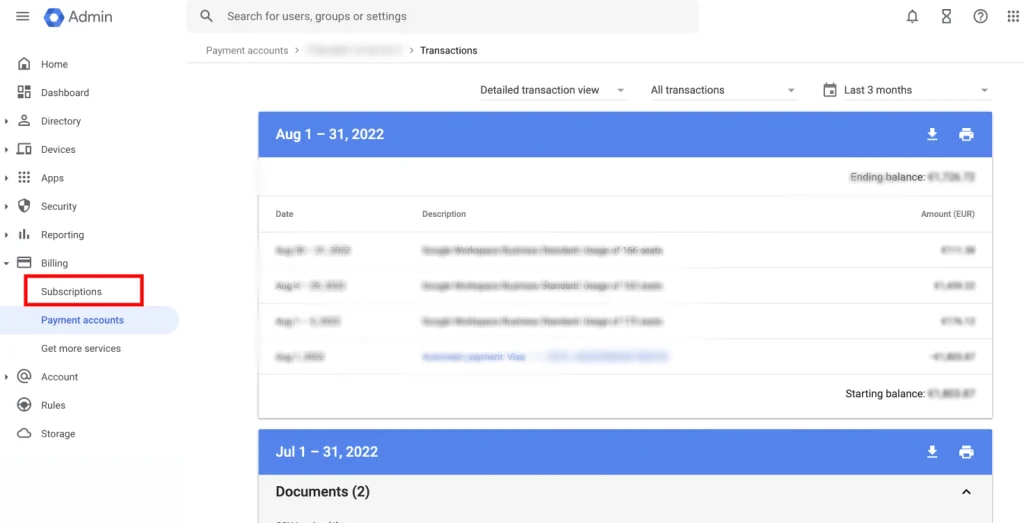
In the Google Admin console, invoices live under Billing, then Payment accounts, then Transactions (or Documents, depending on your account type). Each invoice details the billing period, seat count, and total charged.
If you’re billed through Squarespace, invoices appear in your Squarespace Invoices panel instead. One detail worth knowing: if you have multiple Workspace users, Squarespace shows the Google Workspace charge as a single lump sum on your invoice, not broken out per user. Two users on the Starter monthly plan, for example, show as one combined $16.80 line item, not two separate $8.40 charges.
Google Workspace Payment Methods
Google Workspace accepts standard payment methods, credit and debit cards being the most common, with some regions supporting additional local payment options through Google’s billing system. If Google can’t successfully verify your payment information, you may see a message that your payments profile is suspended pending verification, in that case, check your inbox for an email from Google with the specific documents needed and follow those steps directly rather than guessing.
How to Update Your Billing Address, Payment Method, or Country
In the Admin console, this lives under Billing, then Payment accounts, then Payment method, where you can update your card details, billing address, and associated country. Changing your billing country can affect applicable taxes, more on that below, so update this promptly if your organization’s legal address changes.
Understanding Your Invoice
A Google Workspace invoice breaks down your charges by subscription and seat count for the billing period. If you’re on Squarespace, remember that multiple users appear as one combined figure rather than itemized per person, worth keeping in mind if you’re trying to audit costs by user internally; you may need to divide the total yourself.
Taxes may also apply depending on your region: US sales tax, UK and EU VAT, Canadian taxes, and Australian GST are all handled according to your billing address’s local rules, and rates vary by jurisdiction rather than being a flat global add-on.
The Storage Double-Billing Trap
This is a genuinely easy mistake to make and equally easy to fix once you know to look for it. If you previously purchased individual Drive storage add-ons for users while on Business Starter, then later upgraded to Business Standard or Plus, those add-ons don’t automatically cancel. Business Standard and Plus already include pooled storage (2TB or 5TB per user, shared across your organization), which makes the old individual add-on redundant, but Google doesn’t remove it for you.
To check: as an admin, review your active subscriptions under Billing for any lingering Drive Storage line items alongside your main Workspace plan. If you’ve upgraded tiers and still see one, that’s worth canceling to stop paying for storage you no longer need on top of your new pooled allocation.
What Happens If a Payment Fails
If Google can’t successfully charge your payment method, your account enters a grace period rather than being suspended immediately. During this window, you’ll typically still have access while Google attempts to process payment or prompts you to update your card. If the issue isn’t resolved, the account eventually moves to suspended status, at which point access to Workspace apps is cut off until billing is resolved.
How to Cancel or Stop Google Workspace Billing
You can cancel your Google Workspace subscription at any time, on either Flexible or Annual plans, without penalty. Importantly, cancelling Workspace doesn’t mean losing your domain. If you registered your domain through Google as part of signup, you can cancel the Workspace subscription specifically while keeping domain registration active and billed separately; your super admin retains access to the Admin console for domain management purposes even after Workspace itself is cancelled.
If you signed up through Squarespace, the process differs slightly: disabling auto-renew there means your Google Workspace email gets suspended at the end of your current billing cycle, and after 40 days without renewal, it’s disconnected from your site and transferred to Google’s direct billing instead.
Nonprofit Billing: Why You Might Still Get Charged
Google Workspace for Nonprofits waives the cost of the base subscription for qualifying organizations, but it’s not automatically all-inclusive. Additional paid services purchased alongside the free nonprofit edition, extra storage, certain add-ons, still bill normally. If your nonprofit organization is unexpectedly seeing a charge, check your active subscriptions for anything beyond the core free nonprofit plan before assuming it’s a billing error.
Legacy G Suite Billing Confusion
If your Admin console shows reminders about upgrading from G Suite despite believing you’re already on Google Workspace, this usually means your account is still technically on a legacy G Suite subscription that needs a formal upgrade to a current Workspace edition. Completing this upgrade yourself lets you choose your preferred plan; leaving it untouched means Google will eventually auto-upgrade you to an available edition on its own timeline instead. The one exception: individuals and families using a G Suite legacy free edition for non-commercial purposes can opt out of the Workspace transition entirely and continue on the legacy free tier, through a specific opt-out available to super admins in the Admin console.
Google Workspace Billing Through Squarespace: What’s Different
Since Squarespace Domains LLC took over Google Domains in 2023, a meaningful share of Workspace billing now runs through Squarespace rather than Google directly, and it comes with its own specific quirks worth knowing:
- You can’t switch billing cycles or downgrade plans (Plus to Starter, for example) after signing up through Squarespace, this is a hard limitation of that billing path specifically.
- Reseller Access must stay enabled for Squarespace to manage billing and support on your behalf, and disabling it blocks you from adding new Workspace users.
- Google Voice isn’t available through a Squarespace signup at all. If you want Voice, you’d need to either sign up directly through Google or transfer an existing Squarespace-billed account to Google’s direct billing.
- Refund eligibility varies by plan, so check your specific plan’s terms rather than assuming a blanket policy applies.
- Auto-renew timing matters on annual plans. Disabling auto-renew within the 15-day pre-renewal window doesn’t stop the upcoming charge, your subscription still renews once more before it actually expires at the end of that following period.
Google Workspace Billing Support
If you need direct help beyond what’s covered here, support channels vary by how you signed up. Direct Google customers can reach Workspace support through the Admin console’s built-in help. Squarespace-billed customers should go through Squarespace’s own support for billing-specific issues, since Squarespace, not Google directly, holds your billing relationship in that case. If you bought through a reseller, your reseller’s support team is generally the fastest path, since they can see your specific account and rate directly.
Common Mistakes With Google Workspace Billing
Assuming Flexible and Annual differ in billing frequency. Both bill monthly. The real difference is commitment length and per-user rate.
Forgetting to cancel old Drive storage add-ons after upgrading plans. This causes ongoing double-billing for storage that’s now redundant under pooled storage.
Not knowing where your billing actually lives. Direct Google, Squarespace, and reseller billing are three separate systems. Looking for an invoice in the wrong one wastes real time.
Disabling auto-renew too late in an annual cycle. Within the 15-day renewal window, the current charge still goes through regardless.
When to Get Help Instead of Managing Billing Yourself
Billing confusion, wrong plan type, forgotten add-ons, and unclear invoices are some of the more common reasons businesses end up overpaying for Google Workspace without realizing it. This is exactly the kind of ongoing account management an authorized reseller handles as part of the relationship, not just the initial signup.
Google Workspace Resellers provides Google Workspace billing and account management support directly, so questions about your invoice or plan go to a real person rather than a generic support queue.
Current Google Workspace Pricing
For reference, here’s where official and reseller pricing stand as of this guide:
| Plan | Google Direct (flexible) | Reseller Price |
|---|---|---|
| Business Starter, below 300 users | $8.40/user/mo | $3/user/mo |
| Business Starter, 300+ users | $8.40/user/mo | $2.50/user/mo |
| Business Standard | $16.80/user/mo | $13/user/mo |
| Business Plus | $26.40/user/mo | $20/user/mo |
Same Gmail, same Drive, same billing transparency, at a meaningfully lower price. See the full Google Workspace pricing breakdown for every tier.
Honest Limitation
This guide reflects Google’s current published billing mechanics and Squarespace’s current documented billing process, but billing systems, tax rules, and promotional offers change over time, and yours may differ slightly depending on your account’s specific history and region. For anything showing on your actual invoice that doesn’t match what’s described here, checking directly with your billing provider, Google, Squarespace, or your reseller, is the most reliable next step.
FAQs
How does Google Workspace billing work?
Invoices are issued on the 1st of each month, with automatic payment charged on the 2nd. This applies whether you’re on a Flexible or Annual plan; both bill monthly. The difference between them is commitment length and per-user rate, not billing frequency.
Where do I access my Google Workspace billing?
It depends on how you signed up. Direct Google customers manage billing in the Admin console under Billing. Squarespace signups manage it through their Squarespace account’s Billing panel. Reseller customers manage it through their reseller’s own billing system.
Can I cancel Google Workspace and keep my domain?
Yes. Cancelling your Workspace subscription doesn’t cancel domain registration if you registered the domain separately. Your super admin retains Admin console access to manage domain registration even after Workspace itself is cancelled.
Why am I being double-billed for storage after upgrading my plan?
This typically happens when an individual Drive storage add-on purchased under Business Starter isn’t canceled after upgrading to Business Standard or Plus, which already include pooled storage. The old add-on has to be manually canceled; it doesn’t happen automatically.
Is Google Workspace really free for nonprofits?
The base subscription is free for qualifying nonprofit organizations, but additional paid services purchased alongside the free nonprofit edition still bill normally.
What happens if my Google Workspace payment fails?
Your account typically enters a grace period first rather than being suspended immediately. If the payment issue isn’t resolved during that window, the account moves to suspended status and access to Workspace apps is cut off until billing is fixed.
Conclusion
Google Workspace billing is more predictable than it first appears once you know the actual mechanics: monthly invoices on the 1st, automatic charges on the 2nd, and a Flexible-versus-Annual choice that’s really about commitment length, not how often you’re billed. The real complexity comes from knowing where your specific billing lives- Google direct, Squarespace, or a reseller- and watching for the genuine traps like redundant storage add-ons or a promotional rate quietly expiring.
If untangling your current billing setup feels like more trouble than it should, an authorized Google Workspace reseller can take that over entirely, often while also lowering what you’re paying per user in the process.