Quick Answer
You can change your Google Workspace primary domain, but only if your account qualifies. Google blocks the switch in five specific situations, most commonly when you bought your domain through Google at signup, or your domain isn’t verified yet. If you qualify, the process itself is straightforward: add your new domain, verify it, switch to it as primary, then move your users and groups over.
If you don’t qualify, or the process feels risky to do alone, adding a domain instead of switching is usually the safer, faster path. We’ll cover both.
Your primary domain is whatever comes after the @ in your default Google Workspace email address. If your team signs in as name@yourcompany.com, yourcompany.com is your primary domain.
It’s not just about email, either. Your primary domain also controls:
- Google Drive file sharing links
- Google Meet meeting URLs
- Google Sites addresses
- How your organization appears across every Workspace app
Change it, and all of that shifts to the new domain.
Why You Might Not Be Able to Change Your Primary Domain
This is the part most guides skip, and it’s the reason a lot of admins get stuck. Google won’t let you change your primary domain in five specific situations:
- You bought your domain through Google when you signed up. Domains purchased at signup are tied to that account permanently.
- You’re still in your free trial and signed up with the wrong domain. The fix here isn’t a domain change; it’s cancelling the trial and starting over with the right one.
- Your domain isn’t verified yet. Verify it first, or cancel the trial if that’s not possible.
- You’re on a Google Workspace or Google Cloud reseller account. Resellers manage domain changes differently, through their own process.
- You’re on the legacy free edition of G Suite. This old, no-longer-sold tier doesn’t support the standard domain change flow.
If any of these apply, don’t spend hours hunting for a workaround in your Admin console. There isn’t one. Your real options are cancelling a trial, verifying your domain properly, or, in most cases, adding your new domain instead of trying to force a change.
Worth knowing: several of these situations trace back to how the account was set up in the first place. A domain bought through Google at signup, or a trial started on the wrong domain, are both easy mistakes to make without guidance. Setting things up correctly the first time, through an authorized reseller, avoids this problem entirely rather than untangling it later.
The Better Alternative: Add a Domain Instead of Changing It
Google’s own documentation recommends this first, before you attempt a full primary domain switch. Here’s why it’s usually the smarter move:
It doesn’t touch your existing setup. Your current domain, users, and email keep working exactly as they do now.
It’s reversible. If it doesn’t work out, you simply remove the added domain.
It gives you two paths, depending on your goal:
- Domain alias: lets you send and receive email at both domains, at no extra cost. Good if you just want an additional address.
- Secondary domain: creates a separate set of users on the new domain. You pay per additional account, but it’s useful if you’re running two genuinely distinct email identities (say, two brands under one company).
For most rebrands or new-domain situations, adding the domain and slowly transitioning is far less risky than a full primary domain change. You can always complete the full switch later once you’re confident.
Curious what a secondary domain actually costs at your team size? Our Google Workspace pricing breakdown shows exactly what each additional user runs per plan.
How to Change Your Primary Domain, Step by Step
If you’ve confirmed you qualify, here’s the full process.
Step 1: Prepare for the switch
- Make sure you can log into your new domain’s host (GoDaddy, Namecheap, Squarespace, etc.). You’ll need to update settings there.
- If you bought your account through a reseller, tell them before you switch. They handle part of this for you.
- Give your team a heads-up. People will need to update how they sign in.
Step 2: Add your new domain and set up email
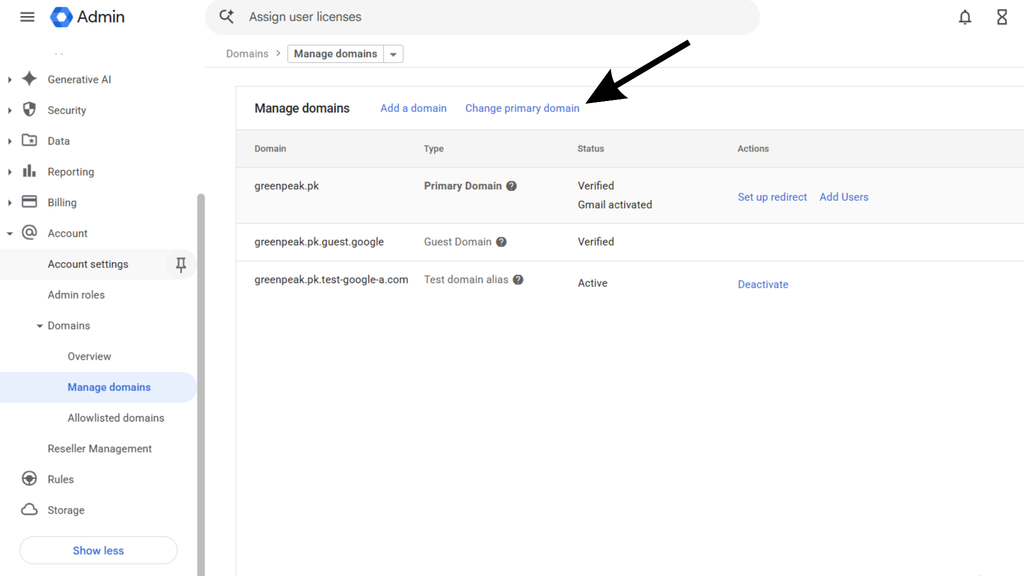
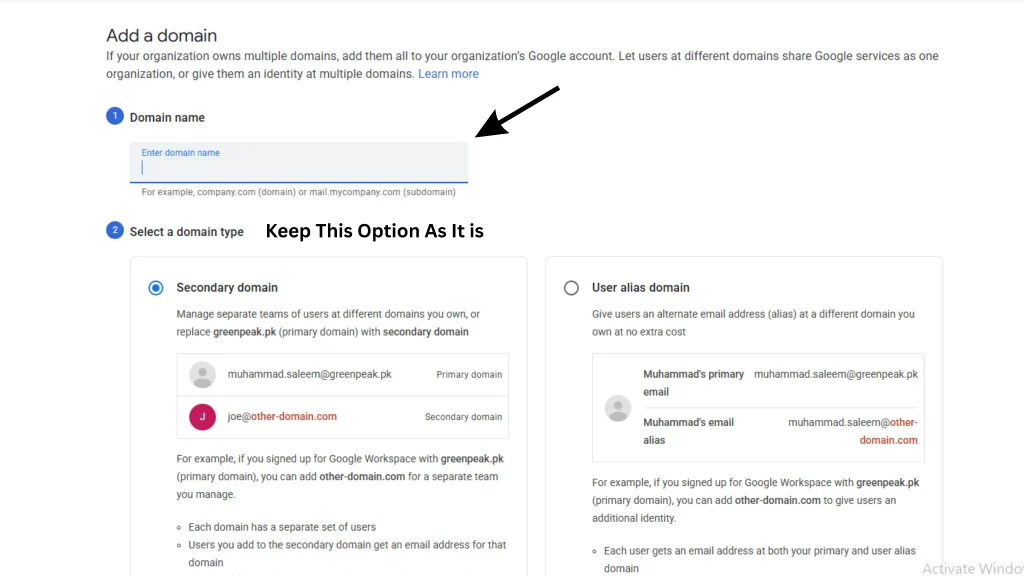
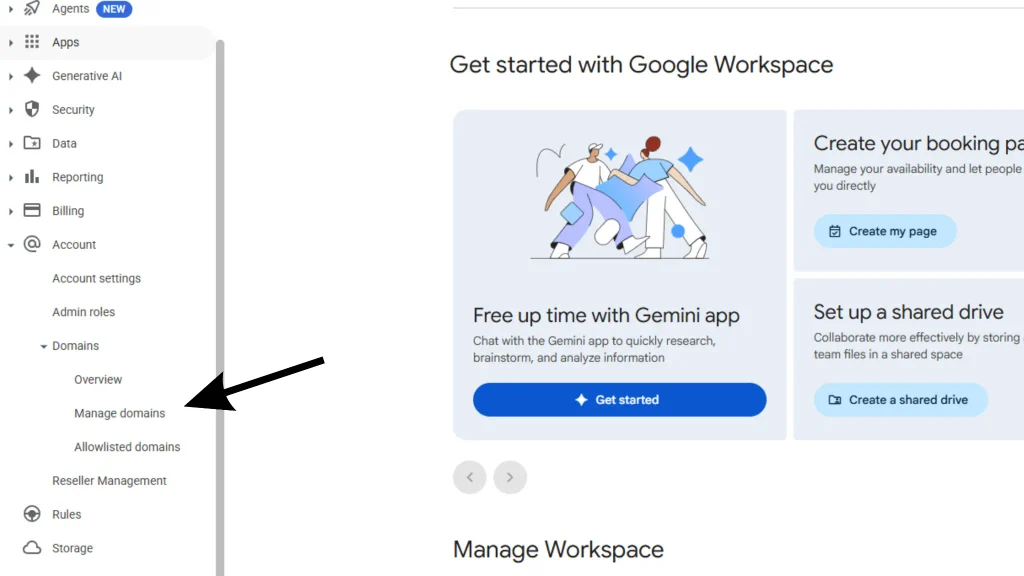
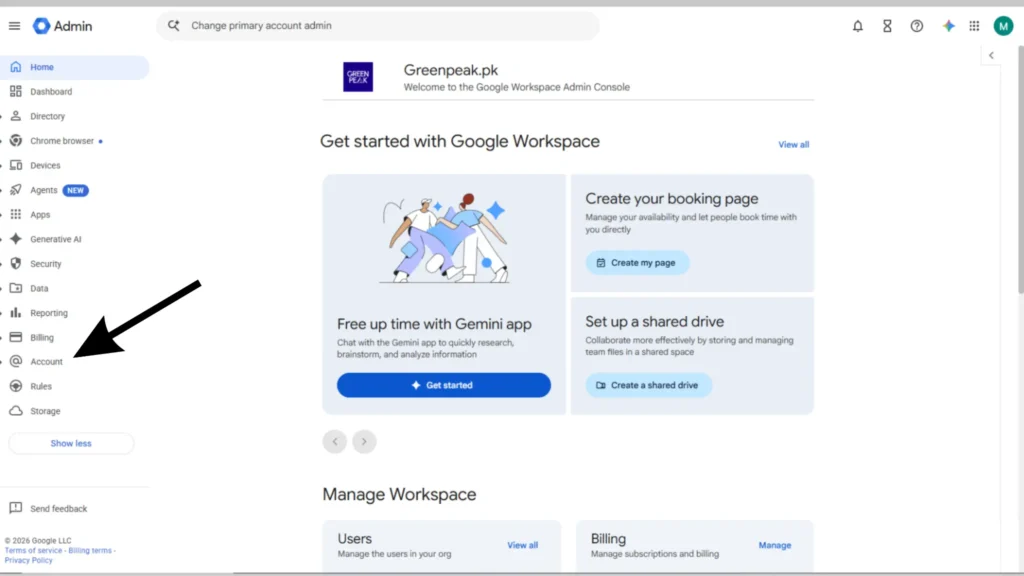
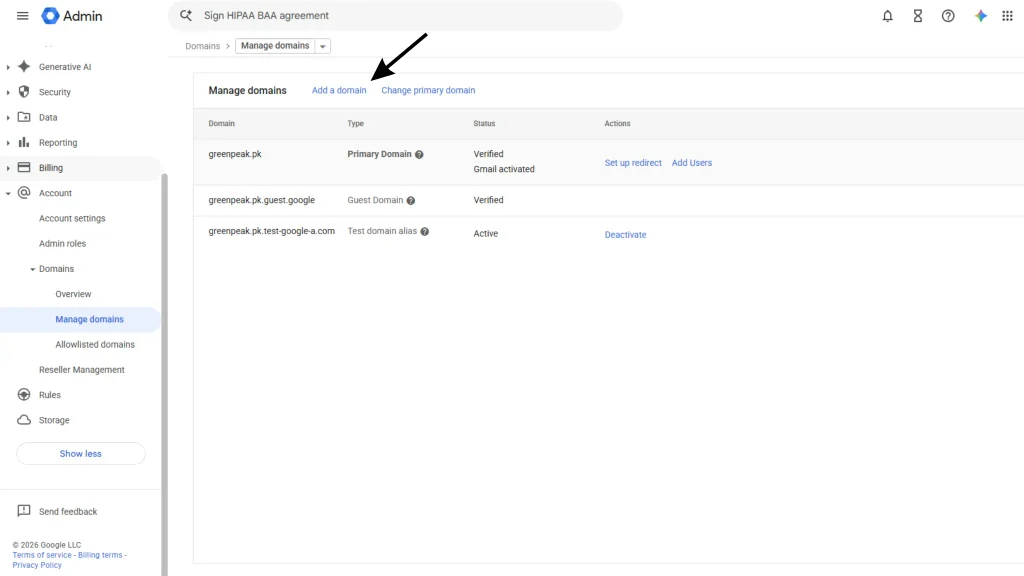
- In the Admin console, go to Account → Domains → Manage domains, then click Add a domain.
- Enter your new domain name and select Secondary domain.
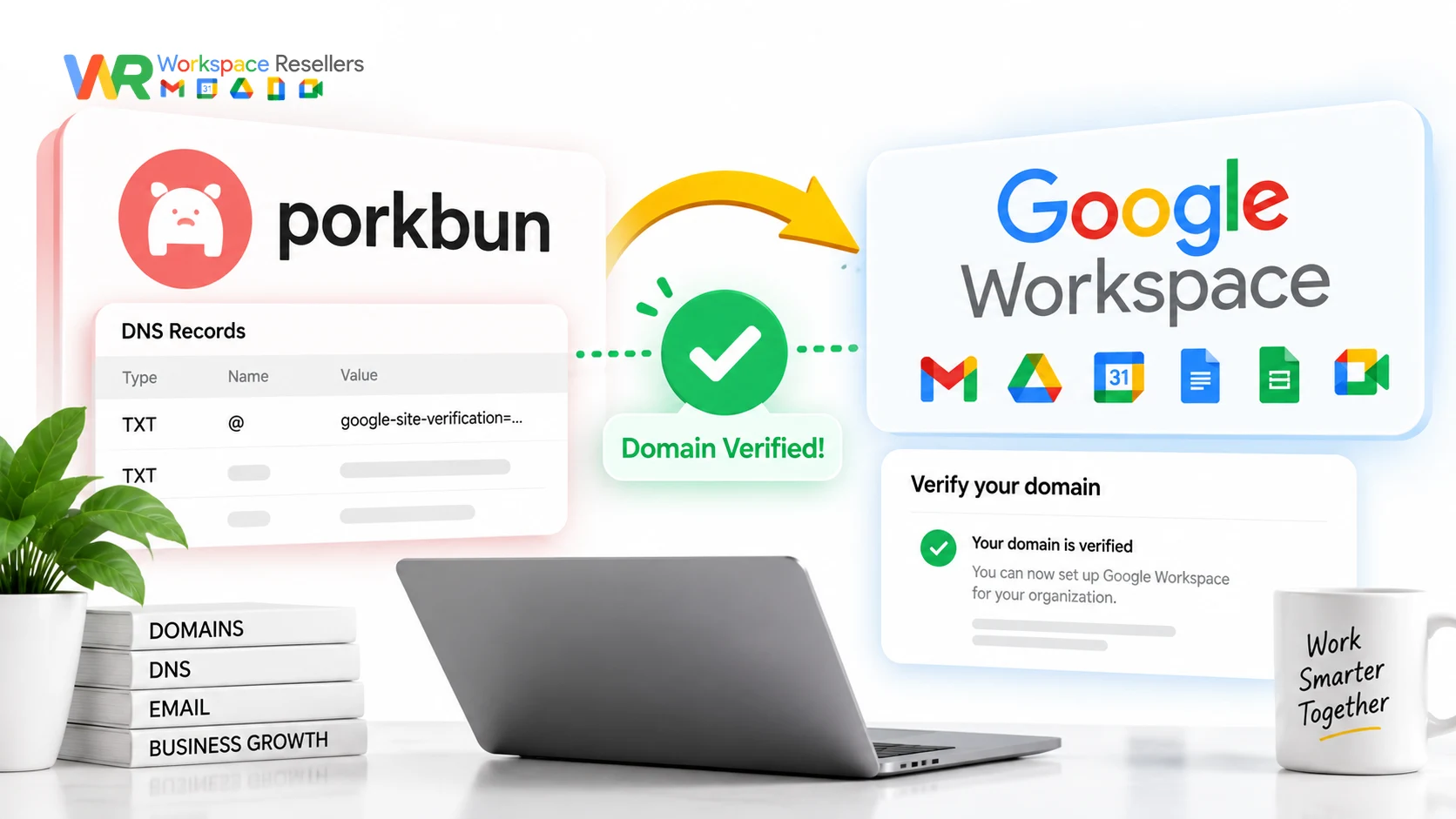
- Verify ownership using Google’s verification steps (usually a DNS record your host adds for you).
- Set up MX records for the new domain, this activates Gmail without touching your current email.
- Optional but strongly recommended: set up SPF and DKIM now. It takes a few minutes and meaningfully cuts your odds of getting flagged as spam later.
Step 3: Switch to your new primary domain
- Back in Manage domains, click Change primary domain.
- Select your new domain and confirm.
- This can take up to 48 hours to fully take effect, though it’s often faster.
Step 4: Move your users and groups over
- Update each user’s primary email to the new domain (or use a spreadsheet if you’re renaming many people at once).
- Rename your mailing groups too, so info@ and sales@ move over cleanly.
Step 5: Decide what happens to your old domain
You have three options:
- Keep it as an alias: old and new addresses both work, free.
- Keep it as a secondary domain: separate users, paid per account.
- Remove it entirely: if you’re done with it for good.
Step 6: Clean up your settings
- Update your billing contact info.
- Re-add any domain aliases (they get unlinked during the switch and need to be re-added; allow 24 hours).
- Check any Marketplace apps; some may need reinstalling or could lose domain-linked data.
- Update custom logos, URLs, and Google Sites links referencing the old domain.
- If you use a reseller, let them know your new domain too.
What Happens to Your Old Email Address
This is the question everyone asks right after the switch: will I lose emails sent to my old address?
Not if you set it up right. If you keep your old domain as an alias, mail sent to either address lands in the same inbox automatically, at no extra cost. If you remove the old domain instead, anyone still emailing your old address will bounce. Most businesses keep the alias active for months (sometimes permanently) specifically to avoid this.
Changing Your Domain If You Manage It Through Squarespace
Since Squarespace Domains LLC took over Google Domains in 2023, a lot of businesses now manage their domain through Squarespace while running email through Google Workspace. The process is the same as above, with one twist: DNS changes (verification records, MX records) happen in your Squarespace domain settings, not a separate registrar dashboard. If you get stuck, Squarespace’s support team can walk you through the DNS side, while Google’s Admin console handles the actual domain switch.
Changing Your Email Address vs. Changing Your Domain
These get confused constantly, so let’s separate them clearly.
Changing your domain means moving from @oldcompany.com to @newcompany.com. That’s everything covered above.
Changing your email address usually means you just want a different username on the same domain, like switching from j.smith@company.com to john@company.com. This is far simpler:
- An admin updates it directly in the Admin console under that user’s account.
- No domain verification, MX records, or 48-hour wait involved.
- You can keep the old address as an alias, same as with a full domain change.
If all you want is a cleaner username, skip everything above and just update the one user record.
Google Workspace for Education: Does Anything Change?
The core process is the same for Education accounts, but a few things differ. Education domains often have additional approval layers tied to school district IT policy, and some licenses (Chrome Education Upgrade purchased through a partner, for instance) require contacting support directly rather than using the self-serve flow. If you’re an Education admin, check with your district’s Google partner before starting, since education accounts sometimes route through a different support channel entirely.
Common Mistakes to Avoid
Skipping the trial-cancellation step. If you’re in a free trial with the wrong domain, trying to “change” it usually fails silently. Cancel and restart instead.
Forgetting to re-add domain aliases after the switch. They get unlinked automatically and don’t come back on their own; you have to manually re-add them, and there’s a 24-hour wait before you can.
Not warning your team first. Admins get signed out mid-switch when their own account updates. Users need to know their new sign-in address before it changes under them.
Assuming Marketplace apps carry over cleanly. Some apps store data tied to your old domain name. Check with each app’s developer before assuming nothing will break.
When to Get Help Instead of Doing This Yourself
Here’s the honest truth about this process: it touches DNS records, email routing, and user accounts all at once. Get one setting wrong, an MX record typo, a verification step skipped, and your entire organization can lose email for hours or days.
If you don’t have dedicated IT staff, or you’re just not confident poking around DNS settings, this is a genuinely reasonable task to hand off rather than risk yourself.
This is exactly where an authorized Google Workspace reseller earns its keep. Leads Monky handles domain setup and switches as part of onboarding, with a real person walking through DNS changes rather than leaving you to Google’s help docs alone. Google Workspace Resellers offers the same kind of hands-on support, at pricing well below Google’s direct rate for the identical product.
Either option means you’re not the one Googling “MX record not propagating” at 11 pm while your company’s email is down.
Buying Google Workspace Direct vs. Through a Reseller
If you’re setting up a new domain anyway, this is a good moment to double-check you’re paying the right price for Google Workspace itself.
| Plan | Google Direct (flexible) | Reseller Price | Monthly Savings |
|---|---|---|---|
| Business Starter | $8.40/user/mo | $2.50-3/user/mo | Up to $5.90/user/mo |
| Business Standard | $16.80/user/mo | $13/user/mo | $3.80/user/mo |
| Business Plus | $26.40/user/mo | $20/user/mo | $6.40/user/mo |
That’s the same Gmail, same Drive, same Admin console, at a lower price, plus setup help most businesses actually need when they’re changing domains. See the full Google Workspace pricing breakdown for every tier.
Honest Limitation
This guide covers Google’s standard domain-change process accurately, but every organization’s setup is a little different. Custom DNS configurations, third-party apps tied to your domain, or unusual account histories can all introduce wrinkles this article can’t predict. If your situation feels more complicated than what’s described here, that’s a sign to get a second opinion before you start, not partway through.
FAQs
Can you change your primary domain in Google Workspace?
Yes, but only if your account doesn’t fall into one of five excluded categories: a domain purchased through Google at signup, an active free trial with the wrong domain, an unverified domain, a reseller account, or legacy free G Suite.
Why can’t I change my primary domain?
The most common reason is buying your domain through Google when you first signed up. The second most common is being in a free trial and realizing you used the wrong domain, in which case you need to cancel the trial rather than try to change it.
How long does a Google Workspace domain change take?
The switch itself can take up to 48 hours to fully propagate, though it’s often faster. Plan for the full window rather than assuming it’s instant.
Will I lose my old email address after changing domains?
Not if you keep it as a domain alias, which lets you send and receive at both addresses at no extra cost. If you remove the old domain instead, anyone emailing that address will bounce.
What’s the difference between changing my domain and changing my email address?
Changing your domain moves your entire organization to a new @domain. Changing your email address just updates one user’s username on the same domain, a much simpler process handled directly in the Admin console.
Should I add a domain or change my primary domain?
Adding a domain is safer and reversible, and it’s what Google recommends trying first. Only switch your primary domain if you specifically need every service (Drive, Meet, Sites) to reflect the new domain by default.
Do I need IT help to change my Google Workspace domain?
Not strictly, but it’s genuinely worth considering. The process touches DNS and email routing simultaneously, and mistakes can take down organization-wide email. An authorized reseller can manage this for you as part of setup.
Conclusion
Changing your Google Workspace primary domain is possible, but it’s not always your best option, and for five specific account types, it’s not possible at all. Before you touch a single DNS setting, check whether you actually qualify, and seriously consider adding your new domain instead of switching outright.
If you do go ahead with a full switch, follow the six steps in order, keep your old domain as an alias, and give your team advance notice. And if any part of this feels outside your comfort zone, that’s exactly the kind of setup work an authorized Google Workspace reseller handles daily, so you don’t have to learn DNS the hard way.